> For the complete documentation index, see [llms.txt](https://www.analytics-docs.laplacetec.com/guide/llms.txt). Markdown versions of documentation pages are available by appending `.md` to page URLs; this page is available as [Markdown](https://www.analytics-docs.laplacetec.com/guide/en/ai_agent/basic_guide.md).
# AI agent
The clearer your question and the more precise your direction, the better the analysis. This guide helps first-time users of the AI agent get high-quality insights.
{% hint style="info" %}
What you'll learn in this guide
Which data you can ask the AI about, the difference between good and bad questions, and ready-to-use question templates for each role.
{% endhint %}
Laplace AI Agent connects order, ad, SKU, CS, and event data at the same time to deliver **multi-source analysis from a single question**. Beyond a simple summary of numbers, you get root-cause diagnosis and actionable insights.
However, the quality of the result is **proportional to the quality of the question.** "Analyze sales" and "Analyze real margin against ad spend by channel for last month" produce completely different results.
{% hint style="info" %}
Start the AI agent from **AI agent** in the left rail. If you see a lock on the icon, you don't have AI permission yet: ask your project admin for access.\
It also works on narrow screens such as phones. Chart previews in answers open in a full-screen window; if one fails to load, click **Try again**.
{% endhint %}
***
## Data sources you can connect
You can freely combine the data below in your questions. **You can ask about several sources at once.**
{% hint style="info" icon="box-isometric" %}
Order data
Order data from SmartStore, Cafe24, Coupang, and more: analyze metrics such as sales by channel, conversion rate, ARPU, and AOV
{% endhint %}
{% hint style="info" icon="megaphone" %}
Ad data
Ad data from Google, Meta, Kakaomoment, and more: analyze metrics such as ROAS, CTR, and BEP
{% endhint %}
{% hint style="info" icon="tag" %}
SKU data
Analyze metrics such as cost, margin rate, contribution margin, and estimated stock-out date
{% endhint %}
{% hint style="info" icon="user-message" %}
CS data
Analyze metrics such as return rate, cancellation rate, CS contribution, early detection of problem products, and lead time
{% endhint %}
{% hint style="info" icon="display" %}
Event data
Analyze event data such as user behavior, funnels, and drop-off rate
{% endhint %}
Combine ad data × event data, SKU data × ad data, or CS data × order data for more detailed analysis.
* Ad data × event data: last-click ad performance analysis (check whether customers whose last visit came from an ad actually convert)
* SKU data × ad data: use contribution margin analysis to see the performance of each SKU and decide whether to keep selling it
* CS data × order data: compare CS contribution, and CS inquiry rate against actual refunds/cancellations
***
## Prompt level guide
Even with the same data, a different question gives a completely different result. See the difference across the three levels below.
### Level 1. Simple question (not recommended)
:x:: Analyze sales
{% hint style="danger" %}
The AI can't tell what to analyze, for which period, or for which channel, so it only gives a basic summary of numbers.
{% endhint %}
### Level 2. Add conditions (fair)
🔶: Analyze last month's SmartStore sales
{% hint style="warning" %}
You get sales figures for a specific channel and period, but no analysis of why they are good or bad.
{% endhint %}
### Level 3. Include purpose + comparison + hypothesis (recommended)
🟢: Comparing last month vs the month before, split the products we spent ad money on into those that actually made a margin and those that didn't, and compare them by channel. I want to check whether some products have a high ROAS but a low margin.
{% hint style="success" %}
Result of this prompt
A combined ad efficiency + profitability report. It automatically identifies loss-making products, compares margins by channel, and shows the change from the previous month.
{% endhint %}
***
## Advanced question formula
Combine the five elements below and anyone can get expert-level analysis. You don't need all of them, but the more you include, the better the result.
{% hint style="info" %}
```
Period + Channel / Scope + Metric + Comparison basis + Purpose/Hypothesis
```
{% endhint %}
| Element | Example | Role |
| -------------------- | ------------------------------ | ---------------------------------- |
| Period | Last month, last 3 months | Narrows the analysis range |
| Channel/Scope | SmartStore, Google Ads | Specifies which data to look at |
| Metric | ROAS, margin rate, return rate | Decides what to measure |
| Comparison basis | vs previous month, by channel | Reveals differences and changes |
| Purpose / Hypothesis | I want to check whether \~ | Sets the direction of the analysis |
The more detailed the prompt, the better the analysis. If you first provide information such as your company, your brand's current position, and the situation your brand is in, you'll get more detailed, report-quality analysis.
Prompt template:
{% hint style="info" %}
Comparing last month vs the month before, write a detailed analysis report on all products we ran ads for, including the items below.
\[1. Profitability classification]
* Split products that made a real margin (after cost + ad spend) and loss-making products by channel
* Flag separately products with a high ROAS but low or negative contribution margin
* Summarize sales, ad spend, cost, real contribution margin, and margin rate by product in a table
\[2. Channel efficiency comparison]
* Compare ROAS, conversion rate, and real margin by channel: SmartStore / Cafe24 / Coupang / Google / Meta
* Highlight cases where the same product has different profitability depending on the channel
* Include a list of channels and campaigns below BEP ROAS
\[3. Month-over-month change analysis]
* Top 5 products whose margin improved and top 5 whose margin worsened
* Products whose sales growth is low relative to ad spend growth (a sign of declining ad efficiency)
* Products with a large change in return rate from the previous month
\[4. Outlier and risk detection]
* Products with high ROAS but also a high return rate, resulting in low real profit
* Products with low paid conversion relative to ad spend (abnormal click-to-purchase conversion rate)
* Products whose stock is depleting too fast or too slowly
\[5. Improvement suggestions]
* Products to cut or stop ads for vs products to increase budget for
* Products that could improve margin by switching channels
* Recommended direction for next month's ad budget allocation
Report format: for each section, structure it as summary → detailed data table → insights.
{% endhint %}
***
## Templates by role
Copy and paste the templates below as is, or **just change the product name and period**.
{% hint style="info" %}
More templates 👉
{% endhint %}
### Marketer
{% code title="Ad channel efficiency analysis" overflow="wrap" %}
```
Compare ROAS and paid conversion rate by Google/Meta ad channel for this month. Also list campaigns below BEP ROAS, and analyze why efficiency dropped compared with last month.
```
{% endcode %}
{% code title="Funnel drop-off analysis" overflow="wrap" %}
```
During the promotion period, compare the share of users who dropped off after adding to cart with the share who went on to convert, based on GA4. Show me as a funnel which step has the most drop-off.
```
{% endcode %}
### MD / Product manager
{% code title="Product profitability analysis" overflow="wrap" %}
```
Show the cost, margin rate, and contribution margin of all products, broken down by channel. Flag products with a high return rate separately, and analyze the causes for products in the bottom 20% by margin rate.
```
{% endcode %}
{% code title="New product performance comparison" overflow="wrap" %}
```
Compare sales volume, margin, and return rate of this month's new products against existing products. Classify new products with good and poor early performance, and tell me what they have in common.
```
{% endcode %}
### Operations / SCM
{% code title="Inventory health analysis" overflow="wrap" %}
```
Calculate the estimated stock-out date based on current inventory, and list products that need to be reordered given the lead time. Also classify overstocked and understocked products.
```
{% endcode %}
### CS manager
{% code title="Return / cancellation issue detection" overflow="wrap" %}
```
List products with a refund/cancellation rate of 8% or more over the last 3 months, and show them together with whether ads were running for them. Also tell me about patterns in products with recurring problems.
```
{% endcode %}
### Owner / CEO
{% code title="Monthly business summary" overflow="wrap" %}
```
Summarize this month's sales, ad spend, margin, and return rate across all channels compared with last month. If any product or channel has an issue that needs attention, tell me that first.
```
{% endcode %}
***
## FAQ
When the AI's answer isn't what you expected, the cause is usually how the question was asked.
| Symptom | Cause | Fix |
| ------------------------------- | ----------------------------- | --------------------------------------- |
| The answer is too short | The question is vague | Specify the period, channel, and metric |
| It's not the analysis I wanted | No purpose given | Add "I want to check \~" |
| Only numbers, no interpretation | Didn't ask for interpretation | Add "Also analyze the causes" |
{% hint style="warning" %}
Common mistakes
Questions that are too broad, like "Analyze my data" or "Tell me what sold well", leave the AI unsure what to analyze, so it only gives a basic summary.
{% endhint %}
{% hint style="info" %}
Can I ask about several channels at once?
* Yes, multi-source analysis at the same time is supported.
{% endhint %}
{% hint style="info" %}
Can I ask follow-up questions?
* Yes, just continue from the previous result.
{% endhint %}
***
## Pro Tips
Tips for getting more out of the AI agent.
{% hint style="info" %}
Prompt templates for generating reports 👉
{% endhint %}
1. Start with a hypothesis\
Instead of a vague "Analyze this", include a hypothesis such as "I want to check whether A is causing B" to get a much more accurate analysis.
2. Specify the comparison basis\
State vs previous month, vs same period last year, or a comparison between channels, and changes and differences are analyzed automatically.
3. Dig deeper with follow-up questions\
Once you have a result, ask right away "why is that?" or "how can we improve it?". You don't need to explain everything again from the start.
4. Tell it your role\
Tell it whose perspective you want: marketer, MD, owner, etc.: and you'll get insights that better fit the context.
5. Have it remember information you use often\
Save your role, analysis types, and company information in **AI memory** and **Project knowledge** so you don't have to explain them every time. See [AI memory and project knowledge](#memory) below.
***
## AI memory and project knowledge
Manage what the AI agent remembers in **Settings** › **Alerts & AI**.
| Menu | Scope | What it holds |
| --------------------- | --------------------- | --------------------------------------------------------------------------------------------------------- |
| **AI memory** | Applies to you only | **My settings** (**My roles** · **Analysis types**), **Analysis history**, **Learned from conversations** |
| **Project knowledge** | Shared by all members | Project background such as data sources, dashboards, SKU matching, and business context |
### AI memory guide
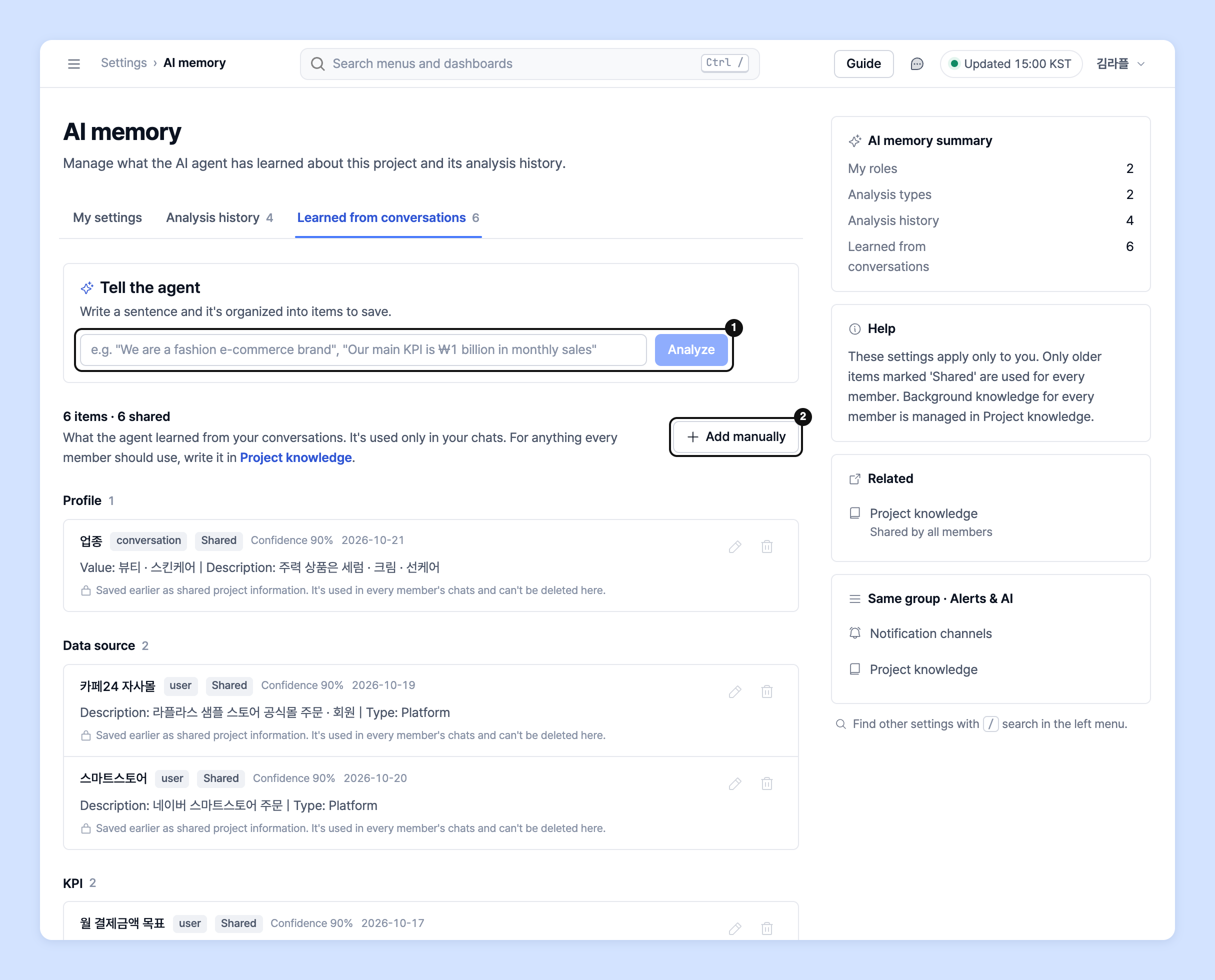
1. Click **Settings** at the bottom of the left rail, then click **Alerts & AI** › **AI memory** in the navigation panel.

2. On the **My settings** tab, choose **My roles** (you can select more than one) and **Analysis types**. Add analysis types that aren't in the list with **Added manually**. Your choices are saved immediately.
3. On the **Analysis history** tab, see the analyses the agent has run and delete records you don't need.
4. On the **Learned from conversations** tab, check what the agent has learned from your conversations. Write a sentence in the **Tell the agent** field and click **Analysis** to organize it into items. Review them, then click **Save all**. You can also add items one at a time with **Added manually**.
### Project knowledge guide
1. Click **Settings** › **Alerts & AI** › **Project knowledge**.
2. If no knowledge has been learned yet, click **Start analysis**. The AI agent automatically organizes the project's data sources and dashboards. The analysis continues even if you go to another screen.
3. Click **View detail** on an item to check its content, change it with **Edit**, then click **Save**. Edited items are marked **Edited**.
4. **Business context** is not created by the analysis. Write down your business model and the context needed for analysis yourself.
{% hint style="warning" %}
Notes on AI memory and project knowledge
* **Clear all my memory** clears only your memory (learned from conversations · analysis history · my settings). Other members' memory and project knowledge remain.
* **Clear project knowledge** affects all members' AI conversations and can't be undone. You can rebuild it with **Start analysis**.
* Older items marked **Shared** are used in all members' conversations and can't be deleted from **AI memory**.
* If you don't have AI permission, **Read-only** appears at the top of the screen. You can view the content but can't add, edit, or delete.
{% endhint %}
***
## Ask your dedicated manager
Have more questions about the formulas?
Contact us through the contact page or by email below. Your account manager will help you.
> 💬 [Contact us on our website](https://www.analytics.laplacetec.com/contact)
**Email:** [**product@laplacetec.com**](mailto:product@laplacetec.com)