> For the complete documentation index, see [llms.txt](https://www.analytics-docs.laplacetec.com/guide/llms.txt). Markdown versions of documentation pages are available by appending `.md` to page URLs; this page is available as [Markdown](https://www.analytics-docs.laplacetec.com/guide/en/etc/alert/slack.md).
# Slack integration
{% hint style="info" %}
With Slack integration set up, you can follow daily changes in sales, units sold, purchasing users, number of payments and more. Get your daily report right in Slack.
{% endhint %}
## Slack integration guide
{% embed url="" %}
Download the video
{% file src="/files/3giM6jzYcaz9mIG0aNZg" %}
1. Click **Settings** at the bottom of the left rail.
2. In the navigation panel, go to **Alerts & AI** › **Notification channels**.
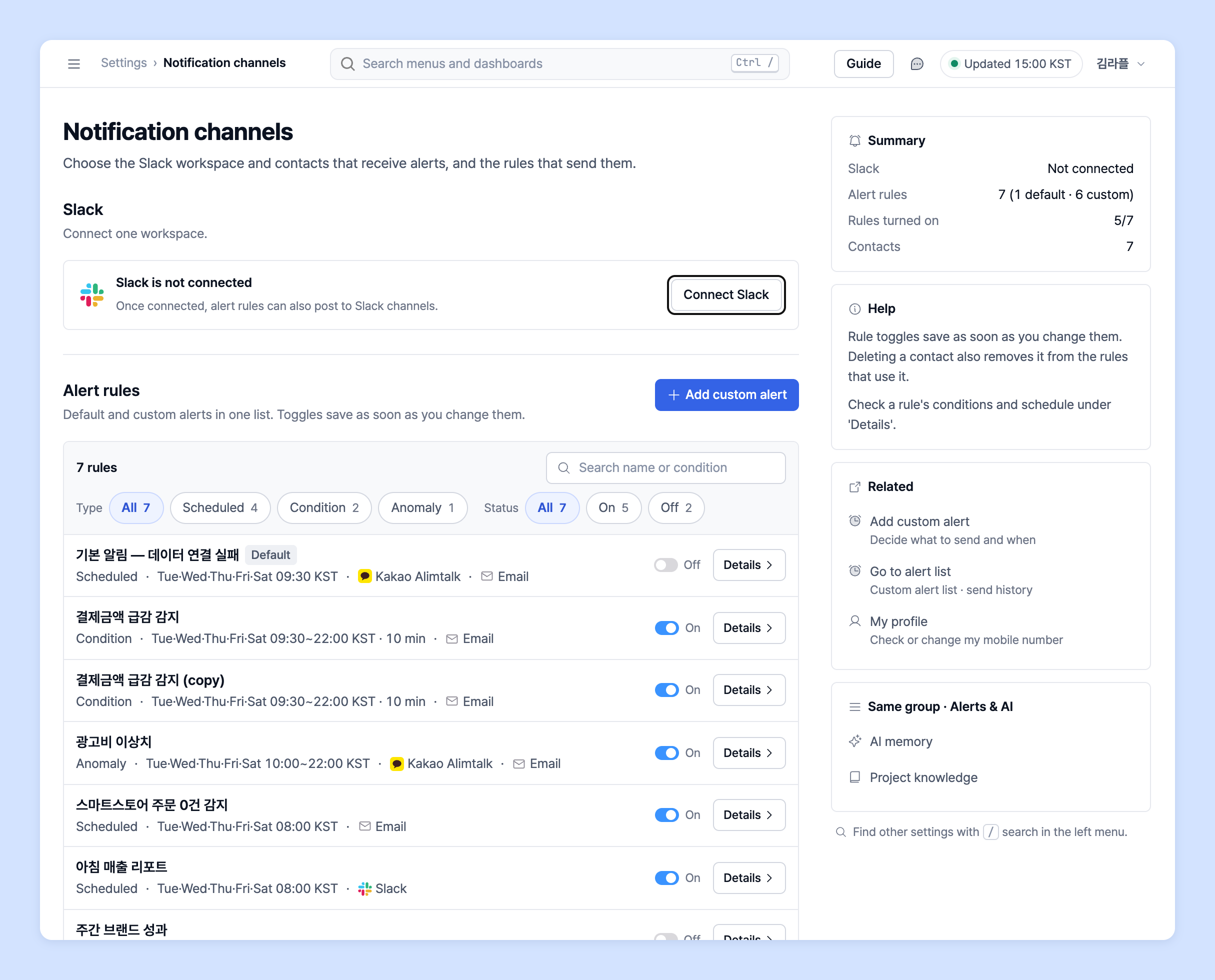
3. In the **Slack** section, click **Connect Slack**.
4. A confirmation dialog opens. To also receive default alerts in Slack, keep **Also send the 3 default alerts (sales · ad spend · purchase summaries) to Slack** checked and click **Connect Slack**.\
(If you uncheck it, Slack is connected without changing any alert rule.)

5. Slack's approval page opens in a new window. Choose the **workspace** to connect and the **channel** to receive alerts, then click Allow.
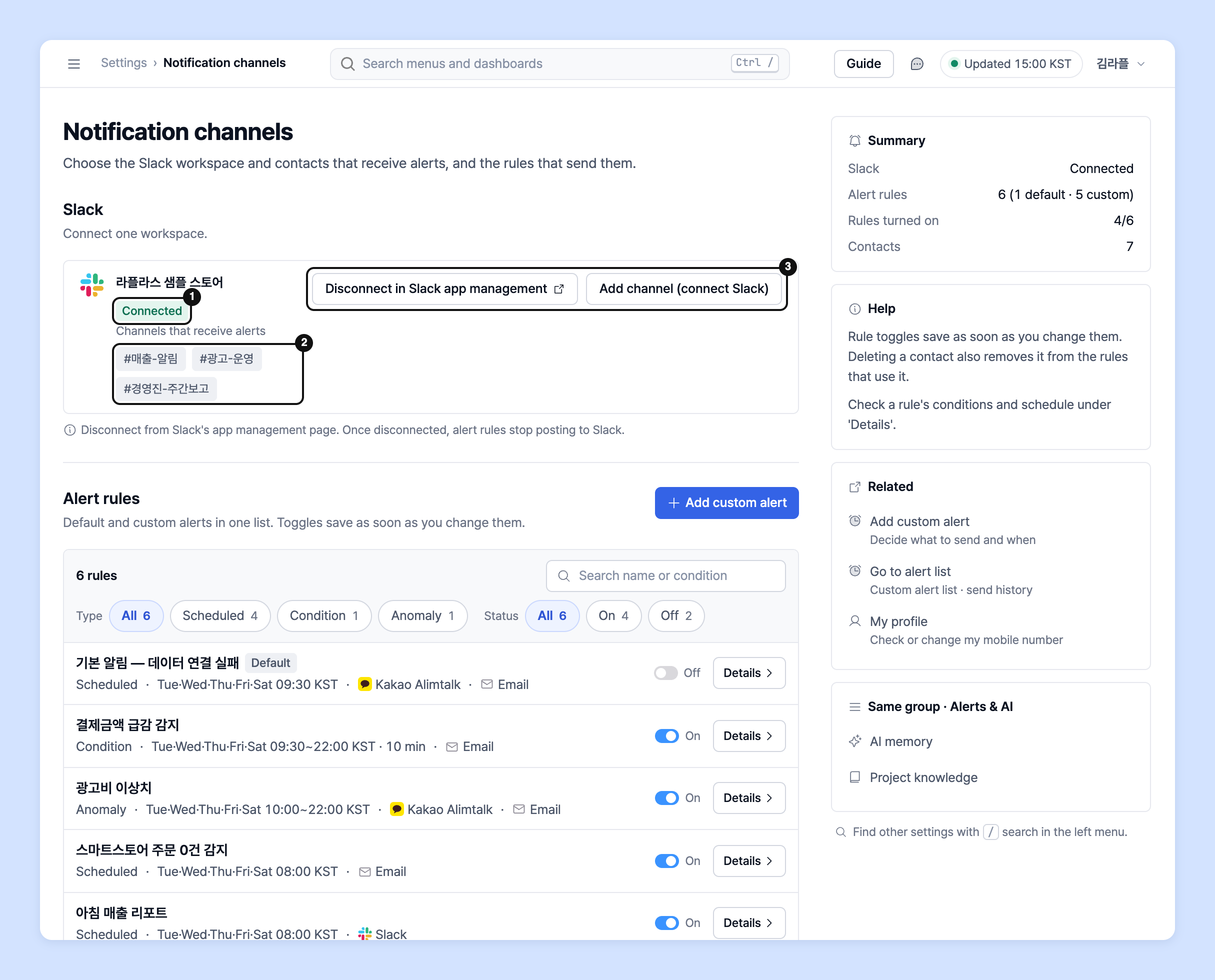
6. Back in Laplace, the **Slack** section shows **Connected** and the **Channels that receive alerts** list.
7. To receive alerts in other channels too, click **Add channel (connect Slack)** and add a channel as in step 5.
8. Slack alerts are sent to the connected channel starting the next morning.
{% hint style="info" %}
To receive only certain alerts in Slack, click **Details** on that alert's row in **Alert rules** to open it, then add or remove Slack channels in **Alert settings**.
{% endhint %}
{% hint style="warning" %}
Things to note when integrating Slack
* You can connect only **one Slack workspace**.
* To disconnect, click **Disconnect in Slack app management** and do it from Slack's app management page. Once disconnected, alert rules no longer send alerts to Slack.
* Check whether the channel connection has been removed in **Settings** › **Data** › **Data source**. If you disconnect the data, you won't receive alerts for that channel.
{% endhint %}
## Privacy policy
{% hint style="info" %}
Laplace Technologies Inc. places great importance on protecting users' personal information and complies with the personal information protection provisions of the relevant laws, including the Personal Information Protection Act and the Act on Promotion of Information and Communications Network Utilization and Information Protection.
For details, see the "Privacy policy" below or the Laplace website.
👉 Laplace [Privacy policy](https://app.catchsecu.com/document/P/26e58ea180c0532)
{% endhint %}
## Ask your dedicated manager
Have questions about setting up Slack alerts?
Contact us through the page below or by email. Your manager will help you.
> 💬 [Contact us on our website](https://www.analytics.laplacetec.com/contact)
**Email:** [**product@laplacetec.com**](mailto:product@laplacetec.com)