> For the complete documentation index, see [llms.txt](https://www.analytics-docs.laplacetec.com/guide/llms.txt). Markdown versions of documentation pages are available by appending `.md` to page URLs; this page is available as [Markdown](https://www.analytics-docs.laplacetec.com/guide/en/etc/plan/explain.md).
# Understanding your Laplace subscription
{% hint style="info" %}
All prices are in US dollars and exclude applicable taxes.
Laplace pricing is based on the average number of orders over the previous 90 days (3 months). This lets both small and large businesses use Laplace at a reasonable price.
{% endhint %}
## How Laplace subscriptions work
Laplace sets plan prices by 3-month average order count. This subscription basis is fair for both small and large businesses. Choose the plan that fits your business size based on your average order count over the last 3 months.
{% hint style="info" %}
Why a 3-month average order count?
* It keeps fees from spiking due to seasonality or promotions.\
If you run promotions or seasonal products, sales can rise sharply over a certain period. Calculating with the 3-month average order count keeps your fee from spiking on any particular day.
* Orders above your plan's monthly allowance are billed per 100 extra orders at the end of each month.
👉 See detailed pricing on the Laplace [**pricing page**](https://www.analytics.laplacetec.com/en/pricing).
{% endhint %}
## Check plan usage
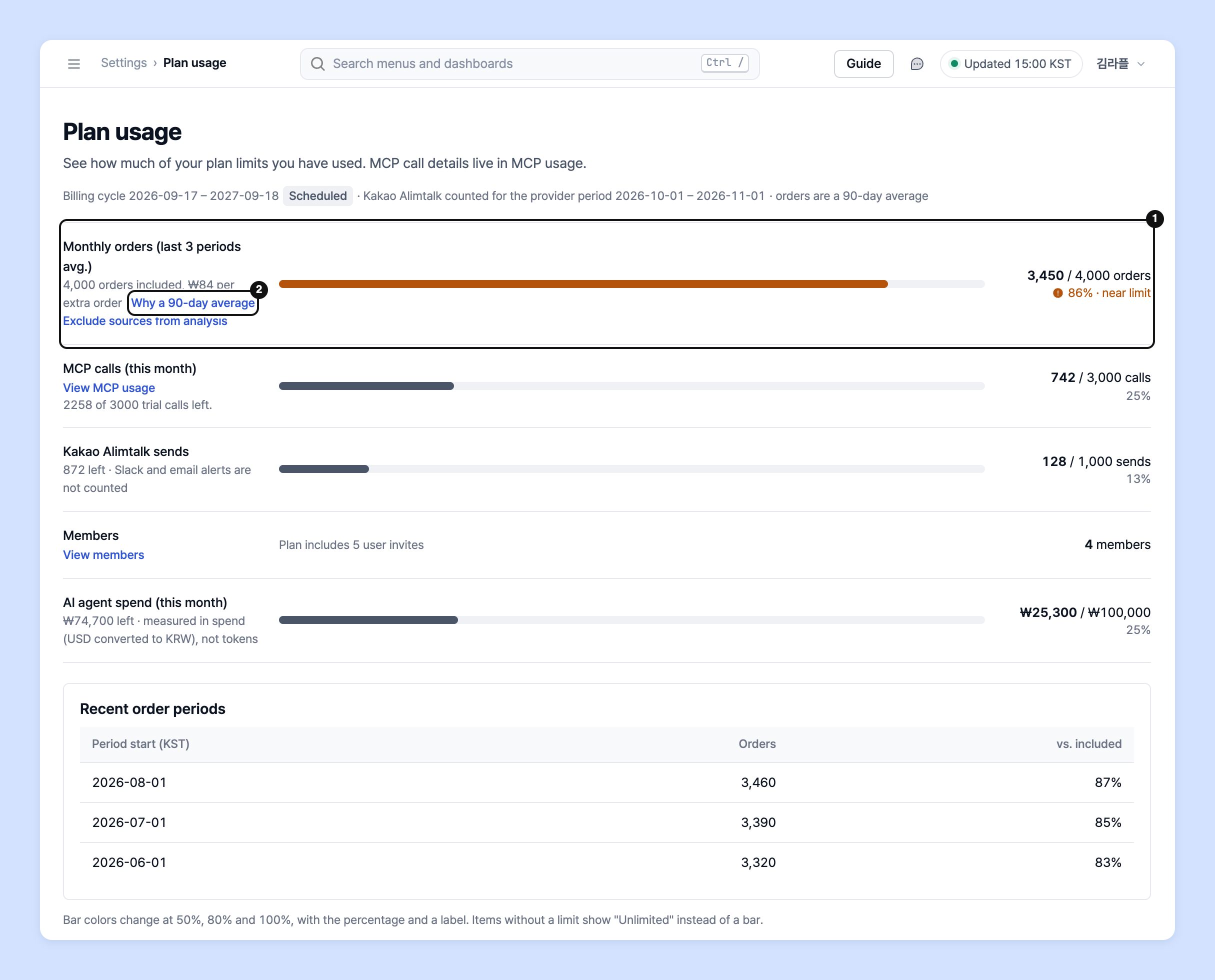
See how much of the orders included in your plan you've used in **Plan usage**.
1. Go to **Settings** › **Project & billing** › **Plan usage**. You can also click **View plan usage** on the **Plan & billing** screen.
2. Check usage against plan limits for each item.
* **Monthly orders (last 3 periods avg.)**: The average order count over the previous 90 days. If it exceeds the included orders, the excess count and estimated additional fee are shown too.
* **MCP calls (this month)**: The number of times AI tools called Laplace via MCP.
* **Kakao Alimtalk sends**: The number of Alimtalk messages remaining. Slack and email alerts aren't counted.
* **Member**: The number of members against the invitees included in your plan.
* **AI agent spend (this month)**: The amount spent on the AI agent.
3. See order counts by period in the **Recent order periods** table below.
{% hint style="info" %}
* Click **Why a 90-day average** to review how it's measured.
* As you connect more brands and sales channels, your order count may rise too. To exclude sources from analysis, click **Exclude sources from analysis** and set them in **Data source**.
* The bar color changes at 50%, 80% and 100%. Items without a limit show **Unlimited**.
* **Plan usage** is visible only to the project owner.
{% endhint %}
## Use Laplace free for up to 3 weeks
Try **every Laplace feature free for up to 3 weeks**! You get **1 week free when you sign up**, **1 week when you connect data**, and **1 week when you add a card**.
{% hint style="info" %}
☝ Adding a card doesn't trigger any payment until you start a plan, so don't worry.
* Each free trial benefit is offered once per account.
* You get 1 week free on your first sign-up, 1 week on your first data connection, and 1 week on your first card registration.
* As with paid plans, you can use every feature Laplace offers, including dashboards, custom dashboards and alerts.
* Settings you create during the trial remain after the free trial ends.
* You can start the free trial without a credit card, and nothing is charged automatically when it ends. Choose a plan and add payment details to continue.
{% endhint %}
## Ask your dedicated manager
Have questions about Laplace plans?
Contact us through the page below or by email. Your manager will help you.
> 💬 [Contact us on our website](https://www.analytics.laplacetec.com/contact)
**Email:** [**product@laplacetec.com**](mailto:product@laplacetec.com)