> For the complete documentation index, see [llms.txt](https://www.analytics-docs.laplacetec.com/guide/llms.txt). Markdown versions of documentation pages are available by appending `.md` to page URLs; this page is available as [Markdown](https://www.analytics-docs.laplacetec.com/guide/en/startguide/connect/ad/searchad.md).
# Connecting Naver Search Ads
{% hint style="info" %}
This connector is for stores operating in Korea.
{% endhint %}
{% hint style="info" %}
**Brand Search (BS) ad spend isn't collected just by connecting.** Brand Search is a contract-based ad, so its ad spend can't be imported via API. Follow the [Naver Brand Search (BS) guide](/guide/en/startguide/connect/spreadsheet/ads/naverbs.md) to enter it in a sheet, or ask your account manager to split the contract fee by day and apply it automatically.
{% endhint %}
## Naver Search Ads connection guide
1. Click **Data Connect** in the left rail, then enter Naver Search Ads in **Search connectors** in the navigation panel, or click **Naver Search Ad Connect** in the **Ad channels** category.

2. Click **Data Connect** at the right of the **Naver Search Ad Connect** screen header to open the connection window. You can see your current step in **How to connect** at the top of the window.
{% hint style="info" %}
If you haven't connected an account yet, the connector screen shows **What you can analyze once connected**. Click **View sample** to preview the screens you'll see after connecting, using sample data. Also check **How to connect** and **Before you start** at the bottom of the screen for the connection steps and what to prepare.
{% endhint %}
3. Enter the `CUSTOMER_ID`, `Access license`, and `Secret key` of the account registered in the Naver Search Ads system, then click the **Connect** button.

{% hint style="info" %}
Not sure how to find your **`CUSTOMER_ID`, `Access license`, and `Secret key`**?
👉 See [**How to find your CUSTOMER\_ID, access license, and secret key**](#api-key) below.
{% endhint %}
* Once you enter a valid `CUSTOMER_ID`, `Access license`, and `Secret key`, data is imported from Naver Search Ads.
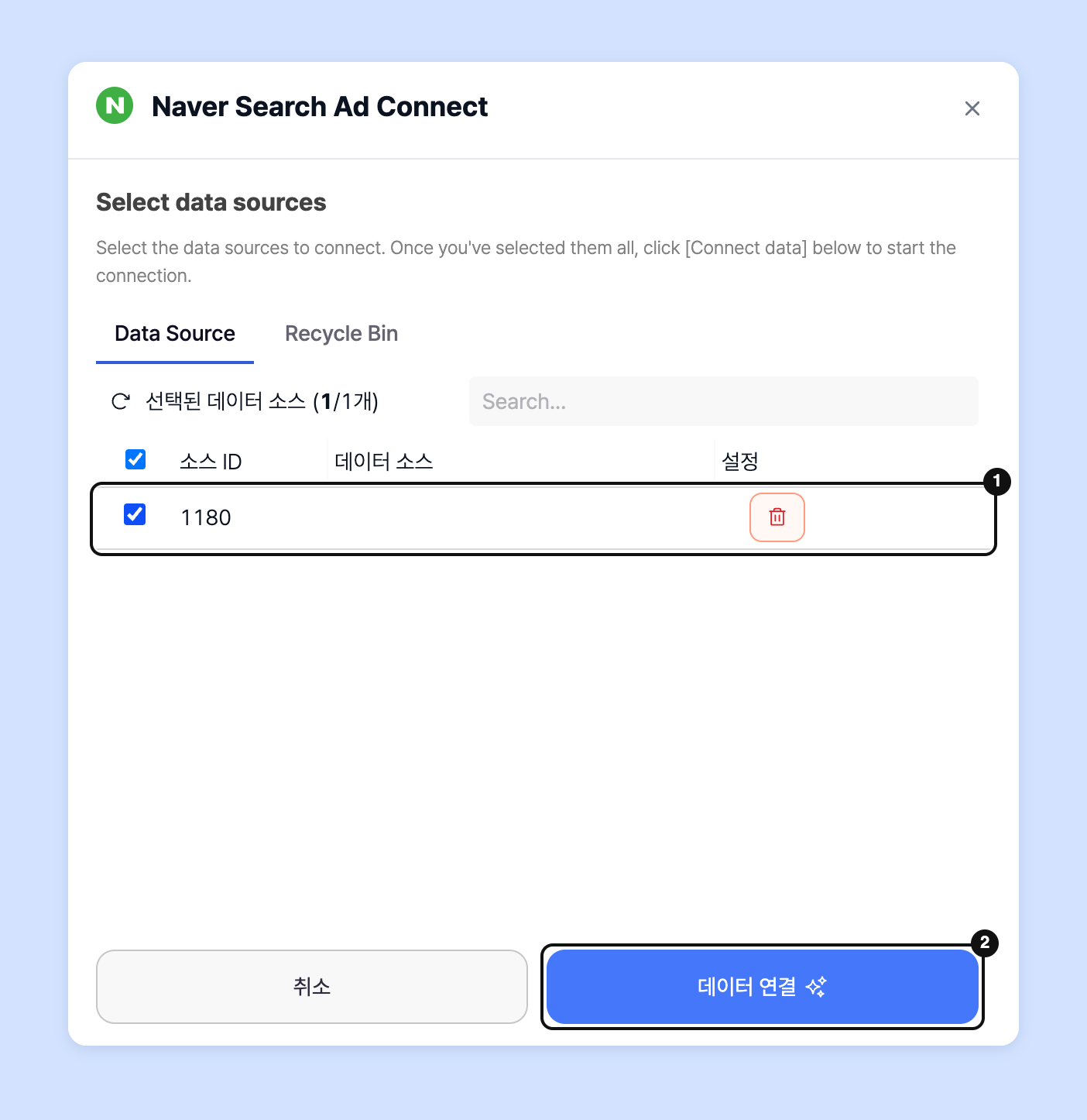
4. In **Select Data Source**, **select every ad account you want to connect** and click the **Connect** button to start the sync.
* Connected accounts appear in the connection table on the connector screen. From ⋯ (**More actions**) at the right of a row, you can **Refresh** and **Renew Authentication**.
* Because we import data from the very beginning of the account's history, **it can take more than an hour if there's a lot of data**.
{% hint style="info" %}
**Why does the data sync take so long?**
👉 Laplace doesn't just import your Naver Search Ads data; it also cleans the imported data and draws the charts. The more data there is, the longer it can take.
💬 You can track progress in **Jobs & data status** at the right of the top bar, and we'll also email you when the sync is complete. Collection continues even if you close Laplace, so feel free to close it.
{% endhint %}
## How to find your CUSTOMER\_ID, access license, and secret key
1. Go to the Naver [Advertiser Center](https://ads.naver.com/) and sign in.

2. Go to 「도구」(Tools) > 「SA API 사용 관리」(SA API usage management) and click 「네이버 검색광고 API 서비스 신청」(Apply for Naver Search Ads API service).

3. Enter the generated "CUSTOMER\_ID", "access license", and "secret key" in Laplace and connect.

{% hint style="danger" %}
If you reissue the access license or secret key after connecting your data, the data connection is cut off. If you reissue them, you must enter the new access license and secret key via the row's ⋯ (**More actions**) › **Renew Authentication** in Laplace's connection table. Be careful not to reissue them once the connection is complete.
{% endhint %}
## Required checks when connecting data
{% hint style="danger" %}
\[1] The top right of the ad system page must show **`(계정 책임자) (Account owner) or (내 계정) (My account)`**.
\[2] **`내 계정: (My account:)`** must be shown below the message "현재 API 서비스를 이용 중입니다." (You are currently using the API service.)
You **must enter** the **`CUSTOMER_ID`, `access license`, and `secret key`** shown when both \[1] and \[2] are satisfied.
{% endhint %}
* Enter the CUSTOMER ID, access license, and secret key on Laplace's Naver Search Ads connection page and connect.
{% hint style="warning" %}
Before connecting data:
* Check that the `number of bulk download reports` created in your Naver Search Ads account `doesn't exceed 90`.
* Note that you can connect only if there's an `ad performance or ad conversion record` in the Search Ads system within the last year.
{% endhint %}
## Ask your dedicated manager
Having trouble connecting Naver Search Ads?
Contact us through the inquiry page below. Your account manager will be happy to help.
> 💬 [Contact us on our website](https://www.analytics.laplacetec.com/contact)
**Email:** [**product@laplacetec.com**](mailto:product@laplacetec.com)