> For the complete documentation index, see [llms.txt](https://www.analytics-docs.laplacetec.com/guide/llms.txt). Markdown versions of documentation pages are available by appending `.md` to page URLs; this page is available as [Markdown](https://www.analytics-docs.laplacetec.com/guide/zh-cn/etc/alert/slack.md).
# Slack 集成
{% hint style="info" %}
设置 Slack 集成后,可以按天查看每日销售额、销售数量、购买用户数、付款笔数等的变化趋势。在 Slack 中轻松接收每日报表吧。
{% endhint %}
## Slack 集成指南
{% embed url="" %}
下载视频文件
{% file src="/files/uSjGrdrBYPl6u5VHs5qP" %}
1. 点击左侧导航栏最下方的「设置」。
2. 在导航面板中进入「通知·AI」›「通知渠道」。
3. 在「Slack」部分点击「连接 Slack」。
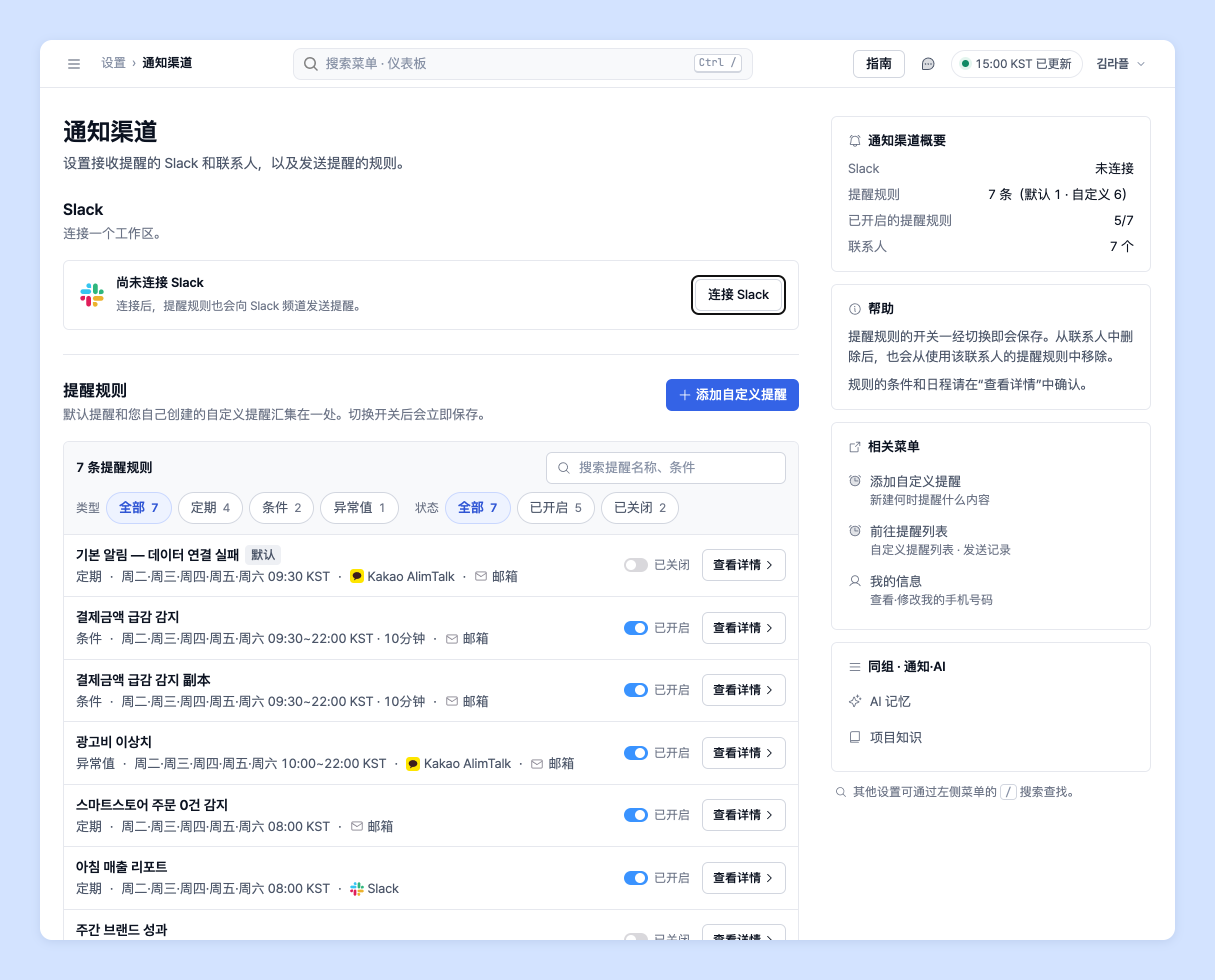 4. 会打开确认窗口。如果也想通过 Slack 接收默认提醒,请保持勾选「连接时,同时通过 Slack 接收 3 个默认提醒(销售额 · 广告费 · 购买摘要)」,然后点击「连接 Slack」。\
(取消勾选后,只进行连接,不更改提醒规则。)

5. 新窗口中会打开 Slack 授权页面。选择要连接的**工作区**和接收提醒的**频道**,然后点击允许(Allow)。
6. 返回 Laplace 后,「Slack」部分会显示「已连接」和「接收提醒的频道」列表。
4. 会打开确认窗口。如果也想通过 Slack 接收默认提醒,请保持勾选「连接时,同时通过 Slack 接收 3 个默认提醒(销售额 · 广告费 · 购买摘要)」,然后点击「连接 Slack」。\
(取消勾选后,只进行连接,不更改提醒规则。)

5. 新窗口中会打开 Slack 授权页面。选择要连接的**工作区**和接收提醒的**频道**,然后点击允许(Allow)。
6. 返回 Laplace 后,「Slack」部分会显示「已连接」和「接收提醒的频道」列表。
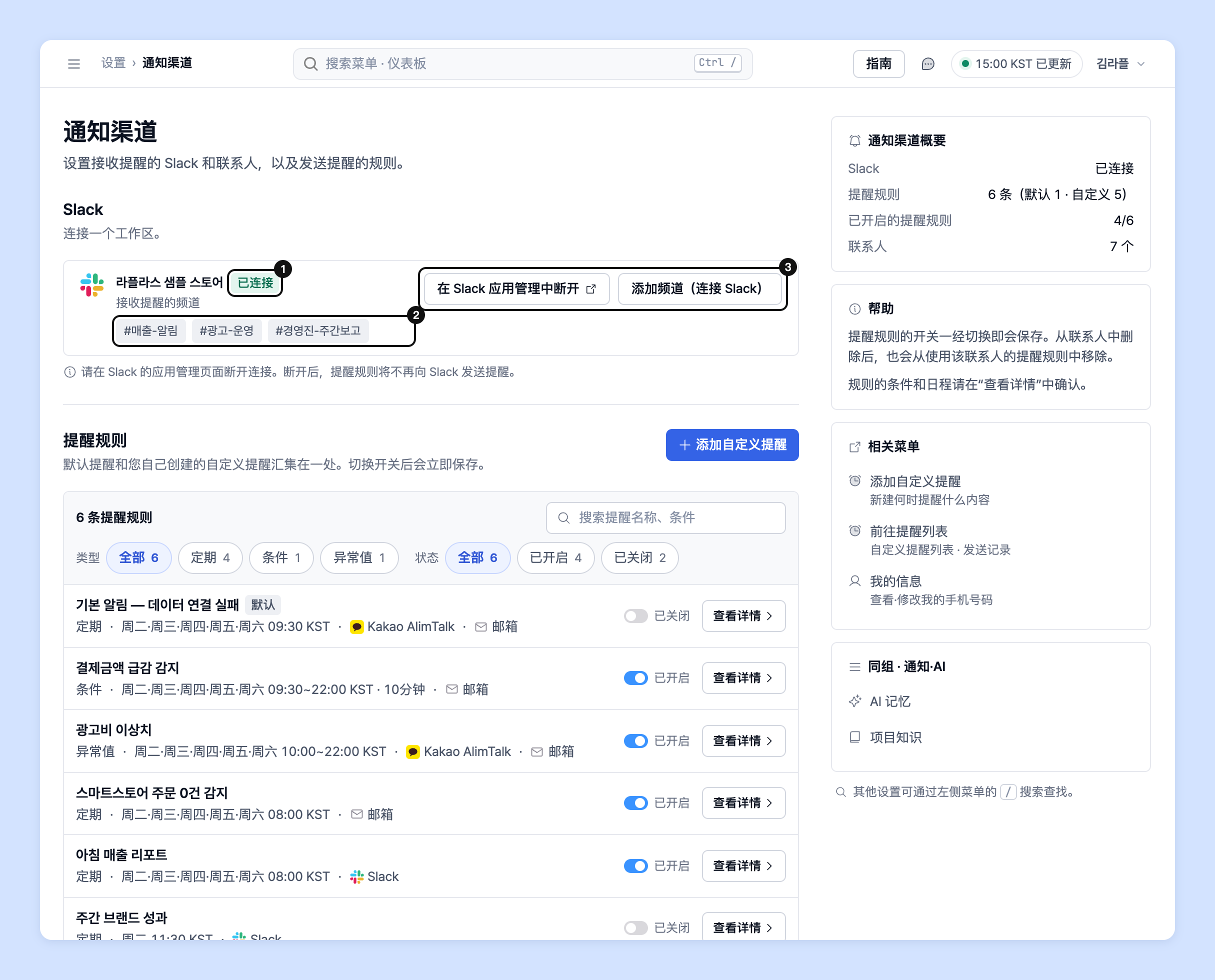 7. 如果还想在其他频道接收,请点击「添加频道(连接 Slack)」,按照第 5 步添加频道。
8. 从次日上午开始,Slack 提醒将发送到您连接的频道。
{% hint style="info" %}
如果只想通过 Slack 接收特定提醒,请在「提醒规则」中点击该提醒行的「查看详情」打开提醒,在「发送设置」中添加或移除 Slack 频道。
{% endhint %}
{% hint style="warning" %}
Slack 集成时的注意事项
* Slack 只能连接**一个工作区**。
* 断开连接时,请点击「在 Slack 应用管理中断开」,在 Slack 的应用管理页面中操作。断开后,提醒规则将不再向 Slack 发送提醒。
* 请在「设置」›「数据」›「数据源」中确认渠道连接是否已断开。断开数据连接后,将不会收到该渠道的提醒。
{% endhint %}
## 隐私政策
{% hint style="info" %}
Laplace Technologies Inc. 高度重视用户的个人信息保护,并遵守《个人信息保护法》《关于促进信息通信网络利用及信息保护等的法律》等韩国个人信息保护相关法律法规中的个人信息保护规定。
详细内容可以在下方的“隐私政策”或 Laplace 官网中查看。
👉 Laplace [隐私政策](https://app.catchsecu.com/document/P/26e58ea180c0532)
{% endhint %}
## 联系专属客户经理
对 Slack 提醒设置有疑问吗?
请通过下方页面或邮件联系我们。专属客户经理会为您提供帮助。
> 💬 [在官网咨询](https://www.analytics.laplacetec.com/contact)
**邮件咨询:** [**product@laplacetec.com**](mailto:product@laplacetec.com)
7. 如果还想在其他频道接收,请点击「添加频道(连接 Slack)」,按照第 5 步添加频道。
8. 从次日上午开始,Slack 提醒将发送到您连接的频道。
{% hint style="info" %}
如果只想通过 Slack 接收特定提醒,请在「提醒规则」中点击该提醒行的「查看详情」打开提醒,在「发送设置」中添加或移除 Slack 频道。
{% endhint %}
{% hint style="warning" %}
Slack 集成时的注意事项
* Slack 只能连接**一个工作区**。
* 断开连接时,请点击「在 Slack 应用管理中断开」,在 Slack 的应用管理页面中操作。断开后,提醒规则将不再向 Slack 发送提醒。
* 请在「设置」›「数据」›「数据源」中确认渠道连接是否已断开。断开数据连接后,将不会收到该渠道的提醒。
{% endhint %}
## 隐私政策
{% hint style="info" %}
Laplace Technologies Inc. 高度重视用户的个人信息保护,并遵守《个人信息保护法》《关于促进信息通信网络利用及信息保护等的法律》等韩国个人信息保护相关法律法规中的个人信息保护规定。
详细内容可以在下方的“隐私政策”或 Laplace 官网中查看。
👉 Laplace [隐私政策](https://app.catchsecu.com/document/P/26e58ea180c0532)
{% endhint %}
## 联系专属客户经理
对 Slack 提醒设置有疑问吗?
请通过下方页面或邮件联系我们。专属客户经理会为您提供帮助。
> 💬 [在官网咨询](https://www.analytics.laplacetec.com/contact)
**邮件咨询:** [**product@laplacetec.com**](mailto:product@laplacetec.com)